Google Ads Guide: How to Set Up Campaigns That Convert Without Burning Your Budget
Set up correctly, Google Ads is the fastest-returning channel in digital marketing; set up poorly, it burns through your budget within weeks. The difference rarely lies in how much you bid. It hides in your measurement, your targeting and the way your landing pages are built. In this guide we walk you step by step through building a Google Ads account from scratch in a way that is data-driven and provable.
How Does Google Ads Actually Work?
Google Ads is not a system for “buying ad space” — it is a real-time auction. The moment someone searches, Google determines which ads match that query, filters out the ineligible ones and ranks the rest. The highest bidder does not automatically land in the top spot.
Ad Rank: the formula that decides the order
According to Google’s own documentation, ads are ranked based on a combination of “your bid amount, the quality of your ads and landing page, the Ad Rank thresholds, the competitiveness of the auction, the context of the person’s search, and the expected impact of assets.” In other words, ad quality and landing page matter just as much as the bid. Google says so explicitly: even if a competitor bids more than you, you can win a higher position at a lower cost with a high-quality ad and landing page.
Quality Score is a diagnostic tool, not a target
Quality Score is a 1–10 indicator reported at keyword level, and it is made up of three components:
- Expected click-through rate: How likely your ad is to be clicked when it is shown.
- Ad relevance: How closely your ad matches the intent behind the user’s search.
- Landing page experience: How relevant and useful your landing page is to the people who click your ad.
Each component is rated “Above average”, “Average” or “Below average”, compared with other advertisers whose ads appeared on the same searches over the past 90 days. Google’s key caveat: Quality Score is not a performance metric to optimize directly, but a diagnostic tool that shows you where the problem is.
You pay less than you bid
“You’re often charged less — sometimes much less — than your maximum cost-per-click (max. CPC) bid.”
Your actual cost per click is the minimum amount needed to clear the Ad Rank thresholds and beat the Ad Rank of the competitor directly below you. That is why improving quality is often more profitable than raising your bid.

Campaign Types: Which One, and When?
One of the most expensive mistakes in Google Ads is starting with a campaign type that doesn’t fit the goal. Trying to create demand when demand already exists — or trying to harvest demand that isn’t there yet — burns budget. The table below summarizes the core distinction, based on Google’s own definitions.
| Campaign Type | Where It Runs | When to Choose It | Critical Prerequisite |
|---|---|---|---|
| Search | Google search results | When there is active search volume for your product or service; the highest-intent traffic | Keyword research + negative keyword list |
| Performance Max | Search, YouTube, Display, Discover, Gmail, Maps | Accounts with a clear sales or lead goal that want to reach all inventory from a single campaign | Healthy conversion data + strong text, image and video assets |
| Demand Gen | YouTube (including Shorts), Discover, Gmail, Display Network | Creating demand among people who aren’t searching for you yet; testing visual-first creative | A high-quality set of videos and images |
| Display | Millions of websites, apps and Google properties | Awareness, and above all remarketing | Properly built audience lists |
| Video | YouTube and partner sites | Brand awareness or lower-funnel conversion support | Creative with a strong first 5 seconds |
| Shopping | Search results and the Shopping tab | Retailers selling their inventory | A clean, optimized Merchant Center product feed |
Rule of thumb: service businesses start with Search, e-commerce moves forward with Shopping + Performance Max, and categories that need brand building add Demand Gen and Video. Launching Performance Max as your only campaign on day one leaves the algorithm flying blind in accounts that have no conversion data.
On Google’s side, the AI layer is expanding fast. For AI Max, announced on Google’s Ads & Commerce blog, the official expectation is that advertisers who activate it in Search campaigns “typically see 14% more conversions or conversion value at a similar CPA/ROAS.” Automation like this is powerful — but all of it only works on top of accurate measurement.
Keyword Match Types and Negative Keywords
In Search campaigns, the match type determines where your budget goes. In Google’s definitions:
- Broad match: Ads may show on searches that don’t contain the literal meaning of your keyword. The widest reach — and the highest risk of waste.
- Phrase match: Ads show on searches that include the meaning of your keyword; the meaning can be implied or appear in a more specific form.
- Exact match: Ads show on searches that have the same meaning or the same intent as the keyword. Maximum control, minimum reach.
Our recommendation for new accounts is clear: start with phrase and exact match, build up real data in the search terms report, and only roll out broad match once your Smart Bidding strategy has learned — and only with a tight negative list. Semrush’s analysis of match types notes that broad match combined with Smart Bidding can produce the lowest cost per click and per conversion; however, that does not apply to accounts without negative keyword discipline.
Negative keywords: the cheapest optimization there is
Negative keywords let you exclude search terms from your campaigns. Terms like “free”, “jobs”, “what is”, “complaints” or “used” are where budget quietly drains away in most B2B and service accounts. There is one critical technical detail:
“Negative keywords won’t match to close variants or other expansions.”
So adding “free” will not automatically block a variation like “for free”; you need to add singular/plural forms and spelling variants one by one. Also note that for Display and Video ads, a maximum of 1,000 negative keywords is taken into account at account level.
Don’t Run Ads Without Conversion Tracking
This is the one non-negotiable rule in this guide. Conversion tracking measures the specific customer action that is valuable to your business after a user interacts with your ad: a form submission, a purchase, a phone call, an app install, even an in-store sale.
Google’s own documentation states that conversion measurement lets you see which keywords and campaigns generate value, calculate your return on investment, and allow Smart Bidding strategies to optimize campaigns automatically toward your business goals. Configuring conversion actions correctly as primary (used for bidding) and secondary is essential too; a wrong setup prevents Smart Bidding from optimizing effectively.
In practice, the minimum setup checklist looks like this:
- Google Ads conversion tag and GA4 set up via Google Tag Manager.
- A realistic value assigned to every conversion action (for example, qualified quote request = average deal value × close rate).
- Enhanced conversions enabled.
- Phone calls and WhatsApp clicks tracked as separate conversions.
- Verification with a test order or test form — consider the setup done not when “we installed it”, but when “the data is coming in”.
If your measurement infrastructure is weak, fixing the website first is more profitable than spending ad budget. This is where our corporate web design and technical infrastructure work comes in; for a detailed look, see our guide to conversion-focused corporate web design.
Smart Bidding Strategies: When and Why?
Smart Bidding refers to strategies that predict the likelihood of a conversion in every auction and adjust the bid automatically. The main ones:
- Maximize conversions: Aims for the most conversions possible within your budget. Well suited to the data-collection phase.
- Target CPA: Drives as many conversions as possible around the cost per acquisition you set. Google’s documentation explicitly states that conversion tracking must be set up before you configure this strategy.
- Maximize conversion value / Target ROAS: The right choice for e-commerce accounts with varying basket values.
A practical roadmap: collect data for the first 2–4 weeks with manual bidding or “Maximize conversions”; once you reach a meaningful conversion volume, switch to Target CPA or Target ROAS. Don’t tighten your target by 40% in one go; move in steps of 10–20% and give the learning period 1–2 weeks after every change. Changing the strategy every week means constantly resetting the algorithm.
Ad Copy and Asset Structure
In responsive search ads (RSAs) you can enter up to 15 headlines and 4 descriptions; at least 3 headlines and 2 descriptions are required to create one. Google tests them in combinations and serves them based on predicted performance.
Ad Strength is rated “Incomplete, Poor, Average, Good, Excellent”. According to Google’s data, advertisers who improve the Ad Strength of their responsive search ads and sitelinks from “Poor” to “Excellent” see on average 15% more conversions. That is the measurable return on creative work.
The structure that works in practice:
- Use the main keyword in 3–4 of your headlines, and benefits, differentiators and calls to action in the rest.
- Always use concrete differentiators such as price, delivery, warranty or certifications; phrases like “quality service” can’t be measured.
- Fill in every asset type: sitelinks, callouts, structured snippets, call, location, price and image assets.
- Build each ad group around a single theme. Google’s Quality Score guidance also recommends grouping keywords by theme and bringing ad copy closer to the search terms.
The Landing Page: Where an Ad’s Fate Is Decided
The landing page is both a Quality Score component and a direct driver of your conversion rate. Google’s own advice is very clear: if someone searches for “flannel shirts” and clicks your ad, the page they land on should show your flannel inventory. The message should be consistent from ad to landing page, and the page should deliver on the offer or call to action in the ad.
The impact of speed has been measured. Think with Google’s “Milliseconds Make Millions” study analyzed 30 million user sessions across 37 brands in Europe and the US and found that an improvement of just 0.1 seconds in mobile site speed was associated with an 8.4% increase in conversions in retail and 10.1% in travel, and a 9.2% rise in average order value in retail.
Campaign-specific landing page checklist: one clear call to action, the value proposition above the fold, mobile-first design, a short form (3–5 fields), trust signals (testimonials, certifications, case studies) and a headline that mirrors the ad copy exactly. You can browse concrete examples of what we’ve built on our our work page.

Setting a Budget and Realistic Expectations
In Google Ads, budgets work on a daily average. On high-traffic days the system can spend up to twice your average daily budget; in return, for most campaigns your monthly spend won’t exceed 30.4 times your average daily budget. So the “it went over budget today” panic is usually unfounded — what matters is the month-end total.
For a realistic budget calculation, work backwards:
- Define your target number of customers per month.
- Use your site’s actual conversion rate to work out how many clicks you need.
- Multiply by the estimated CPC in your industry.
- Add a 20–30% buffer on top for the learning period.
Very broad targeting on a very small budget is the most common form of waste. If your daily budget doesn’t cover at least 3–5 times your target CPA, the campaign runs dry before it can generate meaningful data. In that case, narrowing your geography, ad schedule and keyword set is smarter than increasing the budget.
Which Metrics Matter? (Not Clicks)
Clicks and impressions are the metrics agency reports show most often — and the ones with the weakest link to business results. The glossary below summarizes the metrics you should actually be watching.
| Metric | What It Tells You | Why It Matters |
|---|---|---|
| ROAS (Return on ad spend) | Revenue generated for every 1 TL (Turkish lira) spent | The primary decision metric in e-commerce; read it together with your profit margin |
| CPA (Cost per acquisition) | The average cost of one conversion | The foundation of budget decisions in service and B2B accounts |
| Conversion rate | What percentage of clicks turn into conversions | The real test of landing page and traffic quality |
| Qualified lead rate | How many form submissions are sales-ready | The most valuable signal, coming from your CRM — one Google can’t see |
| Search term waste rate | Share of spend going to irrelevant queries | The measure of your negative keyword discipline |
| Impression share (search) | In how many eligible auctions you appeared | Shows the upper limit of your growth potential |
| CTR | Click-through rate | Only a supporting metric; not a measure of success on its own |
For benchmarking: in WordStream’s 2026 report, which analyzed more than 13,000 search campaigns across 23 industries (April 2025 – March 2026), the all-industry averages were a 6.64% CTR, a $5.42 CPC, an 8.18% conversion rate and a $66.69 cost per lead. The report also notes that cost per lead fell for the first time in five years and that conversion rates rose in 87% of industries.
Cost Dynamics in the Turkish Market
Converting the dollar-based averages above directly to Turkey would be misleading. CPCs in Turkey are generally well below the US average; at the same time, the market is heating up quickly and competition is pushing costs up.
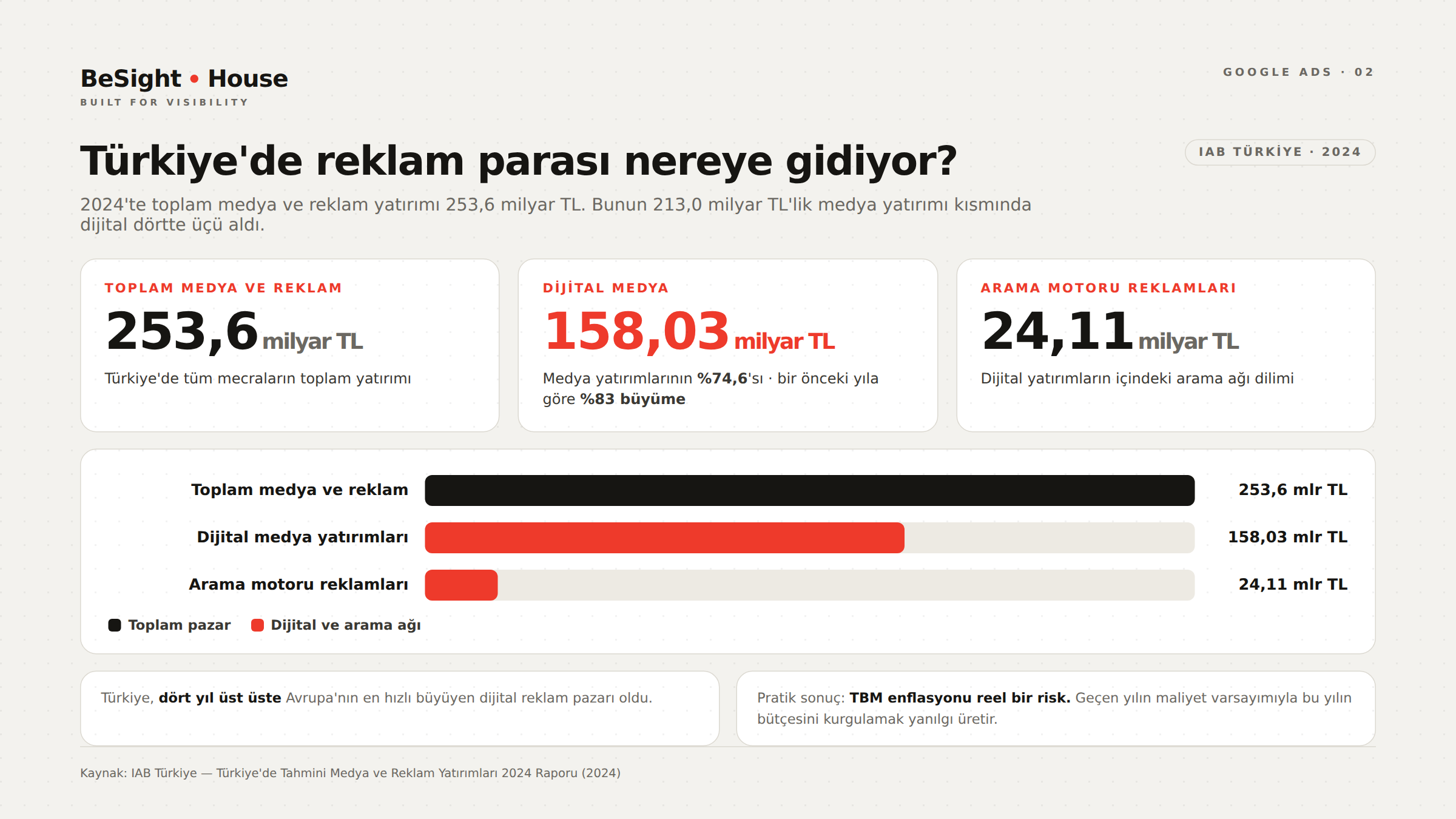
According to IAB Türkiye’s 2024 Media and Advertising Investments report, total media and advertising investment in Turkey reached 253.6 billion TL. Within the 213.0 billion TL media investment portion of that total, digital media took a 74.6% share with 158.03 billion TL and grew by 83% year over year. Search engine advertising accounted for a significant slice of digital investment at 24.11 billion TL. The report highlights that Turkey has been Europe’s fastest-growing digital advertising market for four years in a row.
The practical meaning: in Turkey, CPC inflation is a real risk. Planning this year’s budget on last year’s cost assumptions leads you astray. In addition, because of exchange-rate effects, in some sectors (software, tourism, health tourism) you compete in the same auction as foreign advertisers; in these categories, investing in organic visibility delivers a more defensible cost structure than advertising alone. That’s why we recommend planning Google Ads together with SEO work; we explain the fundamentals in our guide to what SEO is. To prepare for the AI side of search, take a look at our GEO service and our article on AI search visibility.
Transparency When Working With an Agency or Specialist
The most common problem in Google Ads management isn’t performance — it’s a lack of visibility. Before you sign with anyone, get clarity on these points:
- You should own the account. The Google Ads account should be opened in your name, and the agency should only be given manager (MCC) access. When the relationship ends, the account and all historical data stay with you.
- Ad spend and service fees should be invoiced separately. A single “all-in package” price hides the media spend.
- Reports should include conversions and cost. A report built on impressions and clicks is not results reporting.
- The search terms report should be shared. You have a right to see which queries your budget goes to.
- The change history should be open. How many optimizations are made in the account each month is measurable data.
We apply this transparency standard by default in our Google Ads management service. We carry the same approach through to Meta Ads and social media management.
Common — and Costly — Mistakes
- Running ads without conversion tracking. Optimization without data is guesswork, and Smart Bidding can’t work either.
- Not building a negative keyword list. Terms like “free”, “jobs” or “what is” eat budget from week one.
- Cramming everything into one ad group. Once the theme gets diluted, ad relevance and Quality Score drop.
- Sending traffic to the homepage. When the page doesn’t match the ad’s promise, conversion rates can be cut in half.
- Not waiting out the learning period. Changing your bid strategy every 3 days keeps resetting the algorithm.
- Leaving “auto-apply Google’s recommendations” switched on. Automatically applied recommendations can bring uncontrolled match-type expansion and budget increases.
- Leaving the Display Network switched on in a Search campaign. This default setting is the classic source of low-quality traffic.
- Mixing brand and non-brand campaigns. Brand traffic is cheap and converts well; mix them and your real performance disappears from view.
- Looking only at last click. The contribution of upper-funnel channels gets ignored; we cover this in more detail in our Meta Ads guide and our article on social media management.
- Ignoring mobile speed. It has a measured impact, yet it’s the item that gets postponed most often.
Frequently asked questions
How long does it take to see results with Google Ads?
The first clicks arrive the same day, but meaningful optimization usually takes 4–8 weeks. Smart Bidding strategies need a learning period, and you need enough conversion volume to make statistically reliable decisions. Changing strategy based on fluctuations in the first two weeks is one of the most common mistakes.
What is the minimum budget I should start with?
There is no fixed figure; what decides it is the CPC in your industry and your target CPA. A practical threshold: your monthly budget should cover at least 15–20 times your target cost per acquisition, so that enough conversions build up within the month to make decisions. If it doesn’t, narrow your targeting rather than stretching the budget.
Performance Max or a Search campaign?
If your account has no conversion data yet, start with Search. By Google’s definition, Performance Max is a goal-based campaign type that reaches all inventory from a single campaign, and it performs best when you have a clear conversion goal, clean data and strong text, image and video assets. Once data has accumulated, adding Performance Max while keeping Search running is the safest path.
How do I improve my Quality Score?
Look at the three components separately. For ad relevance, split your keywords into tight themes and bring your ad copy closer to the search terms. For landing page experience, align the page content exactly with the ad’s promise and improve speed and the mobile experience. For expected CTR, test your headlines and assets. Use Quality Score not as a target, but as a diagnostic that points the way.
Should I avoid broad match altogether?
You can use it — with conditions. Broad match makes sense together with Smart Bidding and a strong negative keyword list. If conversion tracking isn’t set up or you have no negative list, broad match is the setting that burns through budget fastest. In new accounts, starting with phrase and exact match is the safer option.
Sources
- Google Ads Help — About the Google Ads auction
- Google Ads Help — About Quality Score
- Google Ads Help — 5 ways to use Quality Score to improve your performance
- Google Ads Help — Cost-per-click (CPC) bidding
- Google Ads Help — About keyword matching options
- Google Ads Help — About negative keywords
- Google Ads Help — About conversion tracking
- Google Ads Help — About Target CPA bidding
- Google Ads Help — About Performance Max campaigns
- Google Ads Help — About Demand Gen campaigns
- Google Ads Help — Choose the right campaign type
- Google Ads Help — About responsive search ads
- Google Ads Help — About Ad Strength
- Google Ads Help — About average daily budgets
- Google Ads & Commerce Blog — Unlock next-level performance with AI Max for Search campaigns
- Think with Google — Milliseconds Make Millions
- WordStream — Google Ads Benchmarks 2026
- LocaliQ — Search Advertising Benchmarks for Every Industry (2026 Data)
- Semrush — What Are Keyword Match Types? Examples + Best Practices
- Semrush — Negative Keywords: What They Are & How to Use Them
- IAB Türkiye — Türkiye’de Tahmini Medya ve Reklam Yatırımları 2024 Raporu (Estimated Media and Advertising Investments in Turkey 2024)
If you want to grow without burning your budget, don’t start by launching campaigns — start by verifying your measurement. At BeSight House, our Google Ads management service combines account audits, conversion tracking setup and transparent reporting to build a structure where you can see exactly where every lira you spend goes. For a free initial review of your current account, get in touch with us.