Corporate Web Design: How to Build a Website That Turns Visitors into Customers
For most companies, the corporate website is their cheapest and hardest-working sales rep, yet most sites never do that job. A website that turns visitors into customers is a measurable system in which speed, information architecture, trust signals and form design work together. In this guide, we cover every component that takes corporate web design from an aesthetic choice to a data-driven growth tool, backed by verified sources.
What Is a Corporate Website Actually For?
A corporate website is not your company’s digital shop window; it is the first stage of your sales process. A prospect hears about you in a search result, an ad or a referral, lands on your site and looks for answers to three questions:
- Am I in the right place? Does this company solve my problem?
- Can I trust them? Is this a real business, and do they have references?
- What happens next? How easy is it to get in touch, request a quote or buy?
A site that fails to answer any one of these questions clearly is commercially empty, no matter how much traffic it gets. That is why every project in our corporate web design service starts with these three questions.
The Difference Between a “Brochure Site” and a Site That Sells
The model still common in Turkey is the brochure site, essentially a digital copy of the printed catalog: About Us, Services, Contact. It looks nice, measures nothing and guides no behavior. A site that sells is built on a different logic.
| Criterion | Brochure Site | Site That Sells |
|---|---|---|
| Goal | “We should have a website” | A defined conversion goal (form, quote, call) |
| Content logic | Talks about the company | Talks about the customer’s problem |
| Measurement | None, or visitor counts only | Conversion rate, form completion, revenue by source |
| CTA | A single “Contact” menu link | A context-appropriate call to action on every page |
| Performance | Left to chance | Built around Core Web Vitals thresholds |
| Updates | Once a year | A continuous cycle of testing and improvement |
First Impressions: Credibility Is Built in Seconds
Visitors form a judgment about your site before they start reading its content. As reported by Nielsen Norman Group, research by Gitte Lindgaard and her team shows that aesthetic judgments are made as early as 50 milliseconds after landing on a site, and that given more time, those judgments rarely change. This first reaction directly shapes perceived relevance, credibility and usability.
Stanford University’s Web Credibility Research, conducted with more than 4,500 participants, lists the concrete elements that build credibility: showing there is a real organization behind the site (physical address, photos), demonstrating expertise, providing clear contact information, professional design that fits the site’s purpose, keeping content up to date, avoiding aggressive advertising and eliminating errors such as typos and broken links.
“People quickly evaluate a site by visual design alone.”
— Stanford Web Credibility Research
The practical takeaway is clear: a corporate site with no team photos, no address and no references cannot close the trust gap, even with the best copy. That is why, in the projects we have delivered, we move trust signals directly below the hero section.
How Site Speed and Core Web Vitals Affect Conversion
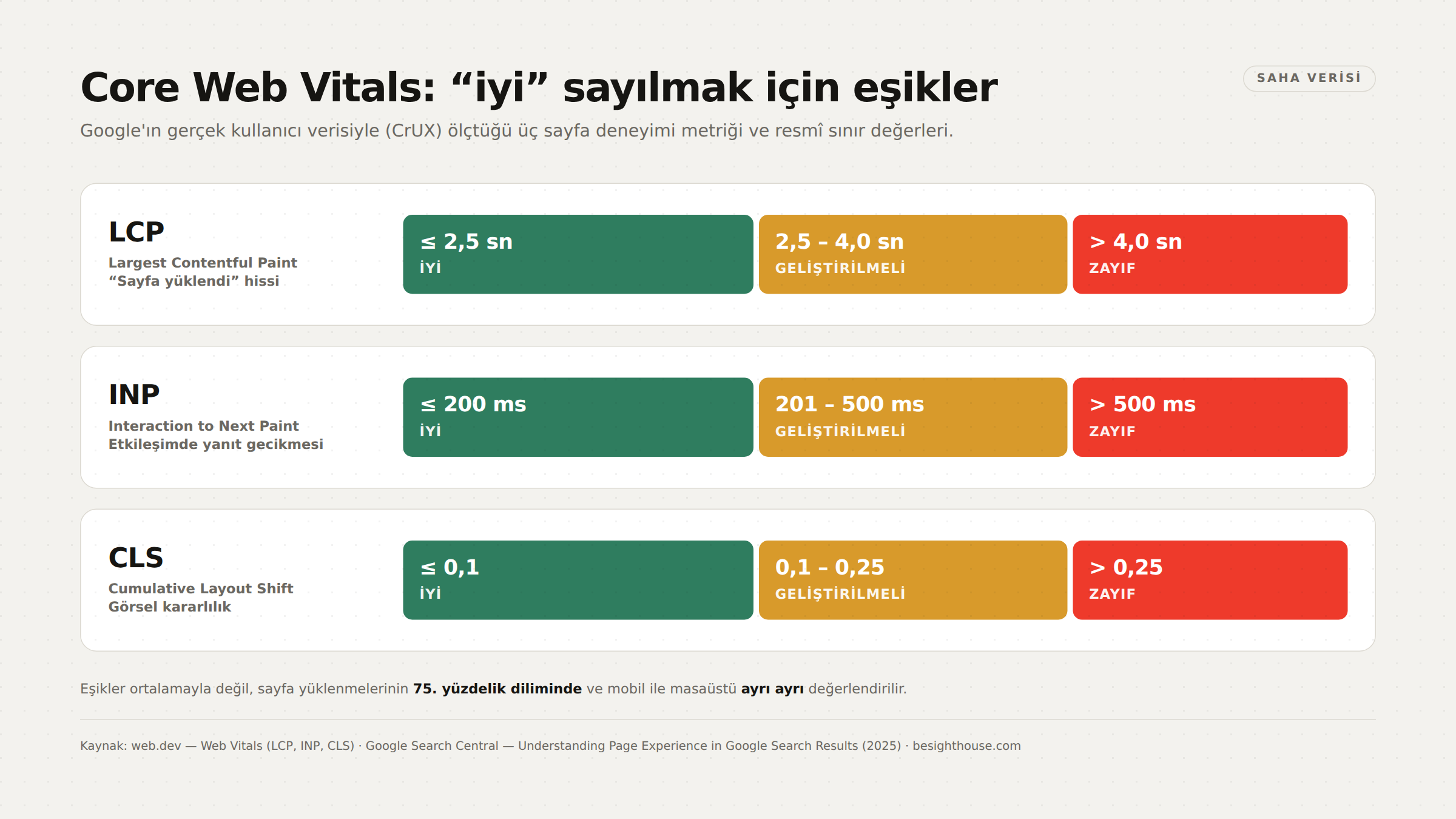
Core Web Vitals are three metrics Google defined to measure real-world user experience. To unpack the jargon: they are not lab tests but field data collected from Chrome users who actually visit your site. This data is gathered in the Chrome UX Report (CrUX) dataset and used by Google Search as a page experience signal.
| Metric | What Does It Measure? | Good | Needs Improvement | Poor |
|---|---|---|---|---|
| LCP (Largest Contentful Paint) | Render time of the largest image, text block or video on screen — in other words, the feeling that “the page has loaded” | ≤ 2.5 s | 2.5–4.0 s | > 4.0 s |
| INP (Interaction to Next Paint) | How long the browser takes to respond to clicks, taps and keyboard interactions | ≤ 200 ms | 201–500 ms | > 500 ms |
| CLS (Cumulative Layout Shift) | Unexpected shifting of content while the page loads — visual stability | ≤ 0.1 | 0.1–0.25 | > 0.25 |
A critical detail: these thresholds are assessed not on the average but at the 75th percentile of page loads, separately for mobile and desktop. In other words, three out of four of your users need to have an experience within the threshold. An average LCP of 2.4 seconds does not mean your site passes.
“Core Web Vitals are used by our ranking systems.”
— Google Search Central — Page Experience
In the same document, Google also states clearly that there is no single “page experience score” and that its search systems may still show relevant content despite a poor experience. So speed alone does not guarantee rankings, but its impact on conversion stands on its own.
Think with Google’s analysis of 11 million mobile landing pages shows that as page load time goes from 1 second to 10 seconds, the probability of a mobile visitor bouncing increases by 123%. The same analysis found that on 70% of the pages examined, it took more than five seconds for the visual content above the fold to display, and the average mobile landing page took about 15 seconds to fully load.
The most common causes of CLS are also well known, and all of them can be prevented at the design stage: images and videos without defined dimensions, web fonts that render at a different size than the fallback font, dynamically sized third-party ads and widgets, asynchronously loaded resources, and DOM elements injected above existing content.
Mobile-First Design Is Now the Default
Google uses the mobile version, crawled with its smartphone bot, to index and rank a site’s content. This has three concrete consequences for design:
- Content parity: The mobile version must contain the same content as desktop. Reorganizing content into accordions or tabs is fine; deleting it is not.
- Structured data parity: Mobile and desktop should carry the same structured data, with Breadcrumb, Product and VideoObject markup as priorities.
- Image parity: Mobile images should match desktop in quality, format and alt text.
Add touch ergonomics to that: tap targets of at least 44×44 pixels, a primary CTA positioned within thumb reach, no horizontal scrolling and body text that never drops below 16 pixels on mobile.
Information Architecture and Navigation
These two concepts are often confused. Nielsen Norman Group draws the distinction like this: information architecture (IA) is the invisible skeleton that defines a site’s content and the relationships between its parts; navigation consists of the visible interface elements, such as menus, breadcrumbs and footers, that let users move through that skeleton.
“IA is the information backbone of the site.”
— Nielsen Norman Group — IA vs. Navigation
Order matters: information architecture first, navigation second. Choosing a menu pattern for aesthetic reasons and then trying to squeeze the content into it means compromising on the ideal structure. Practical rules for corporate sites:
- Keep the main menu to 5–7 items; every additional item dilutes the attention the others get.
- Use the words your customers use in menu labels, not internal jargon (“Web Design” instead of “Our Solutions”).
- Every important page should be reachable from the homepage in no more than three clicks.
- Instead of bundling your services on a single “Services” page, create a separate, in-depth page for each service. This matters both for users and for your SEO efforts.
Conversion-Focused Page Structure: Hero, Social Proof, CTA
High-converting corporate pages are not an accident; they follow a repeatable structure:
- Hero section: A one-sentence value proposition (what you do, for whom, with what result), supporting subcopy and a single primary CTA. Two CTAs of equal weight perform almost as poorly as no CTA at all.
- Trust bar: Client logos, certifications, memberships. This is where the “real organization” signal highlighted by the Stanford research is delivered.
- Problem–solution section: A description of the problem written in the customer’s language, paired with the service that addresses it.
- Social proof: Real testimonials with name, title and company; ideally, case studies backed by numerical results.
- Process transparency: A 3–4 step flow that answers the question “What happens next?” Uncertainty is the quietest killer of conversion.
- FAQ: Removes purchase barriers such as price, timeline and scope up front.
- Closing CTA: A call to action repeated at the end of the page, pointing to the same action.
The rule for CTA placement is not “put it at the top” but “put it at the moment of decision”. On long service pages, placing a context-appropriate CTA at the end of each major section works better than a single sticky button.
Form and Contact Design: Losses in the Last Mile
The budget you spend to drive traffic is either recouped or lost at the form. Baymard Institute’s research on e-commerce checkout flows shows that the average site uses 12.8 form fields, whereas a flow that can be completed with 6–8 fields, credit card details included, is entirely possible. In the same research, 26% of users said they abandoned a purchase because the checkout process was too long or complicated.
The same logic applies to corporate contact forms:
- Justify every field. Fields like “Fax”, “Job title” or “How did you hear about us?” satisfy the sales team’s curiosity and lower conversion.
- Keep labels above the field. When placeholder text is used instead of a label, users lose context as soon as they start typing.
- Show errors per field, in plain language. Not “Invalid input”, but “Enter your phone number in the format 5XX XXX XX XX”.
- Offer alternative channels. Make your phone number, WhatsApp and email address visible; not everyone wants to fill out a form.
- Set up a thank-you page. You need it both for conversion tracking and to explain the next step.
Accessibility (WCAG) and Its Business Value
WCAG (Web Content Accessibility Guidelines) is the accessibility standard developed by the W3C. Release dates: WCAG 2.0 was published on December 11, 2008, WCAG 2.1 on June 5, 2018, and WCAG 2.2 on October 5, 2023 (updated December 12, 2024). The standard rests on four principles — Perceivable, Operable, Understandable, Robust (POUR) — and defines three conformance levels: A, AA and AAA. For corporate sites, the practical target is level AA.
The business case is this: according to the World Health Organization’s fact sheet of March 7, 2023, 1.3 billion people worldwide live with a significant disability.
“This represents 16% of the world’s population, or 1 in 6 of us.”
— World Health Organization — Disability
Accessible design also has major side benefits: sufficient color contrast helps someone using their phone in bright sunlight, a proper heading hierarchy makes life easier for both screen readers and search engines, and keyboard navigability raises overall usability.
Where SEO and Design Intersect
Design and SEO may look like separate disciplines, but they meet in the same decisions. Heading hierarchy (H1–H3), page speed that meets Core Web Vitals thresholds, mobile content parity, image alt text, URL structure and internal linking are all decided at the design stage; they cannot be “bolted on” later.
Today, visibility is no longer limited to classic search results either. For your content to be cited in AI-powered search interfaces, you need clear headings, descriptive paragraphs and structured data; we cover this topic in detail in our guide to GEO and AI search visibility. For core search engine optimization, our guide “What Is SEO?” and our GEO service are good starting points.
The same link applies to paid traffic: in Google Ads or Meta Ads campaigns, a slow and confusing landing page wipes out the value of every click you pay for. You will find how to structure campaigns in our Google Ads campaign management guide and our Meta Ads advertising guide.

Notes Specific to E-Commerce
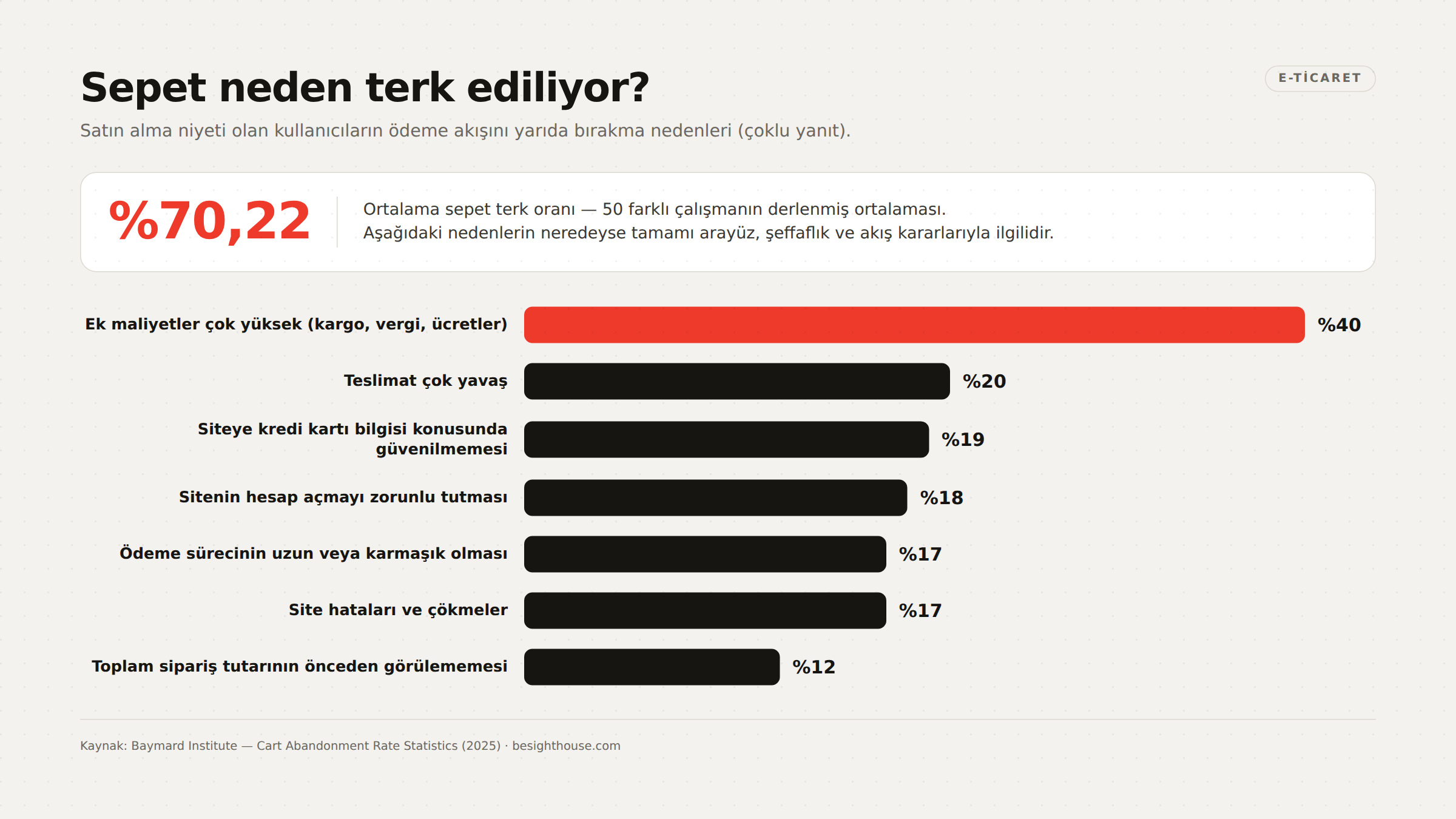
In e-commerce, conversion losses largely come down to measured causes. According to data compiled by Baymard Institute from 50 different studies, the average cart abandonment rate is 70.22%. Among users with purchase intent, the main reasons for abandonment are:
- 40% — Extra costs too high (shipping, tax, fees)
- 20% — Delivery too slow
- 19% — Didn’t trust the site with their credit card information
- 18% — The site required them to create an account
- 17% — Checkout process too long or complicated
- 17% — Website errors and crashes
- 12% — Couldn’t see the total order cost up front
Almost everything on this list comes down to design and interface decisions: showing shipping and taxes transparently at the cart stage, offering guest checkout, placing security badges next to the card form, making the length of the process visible with a step indicator and keeping the checkout flow error-free. These are a matter of execution quality, not marketing budget.
Pre-Redesign Checklist
Wiping your current site and starting from scratch often means wiping out what already works, too. Before you start a redesign, collect these measurements:
| Area | What to Check | Decision Threshold |
|---|---|---|
| Performance | LCP, INP, CLS in CrUX field data (mobile and desktop separately) | Are all three “good” at the 75th percentile? |
| Traffic inventory | Pages that drive 80% of traffic and conversions | The URLs and content of these pages must be preserved |
| Conversion tracking | Are form submissions, calls and quote requests being tracked? | If not, set up tracking first |
| Content audit | Page-level freshness, duplicate content, thin pages | Merge, update or redirect |
| Redirect plan | A 301 mapping for every URL that will change | A complete mapping table must be ready |
| Accessibility | Contrast, keyboard navigation, alt text, heading hierarchy | Target: WCAG 2.2 AA |
| Technical foundation | Sitemap, robots.txt, canonical tags, structured data | Must be validated before launch |
| Competitor comparison | Service page depth and speed of the top 5 competitors | Can the gap be closed, and how? |
Common Mistakes
- Using a slider in the hero section. Most users never see past the first slide; multiple messages dilute the impact of a single clear message and increase CLS risk.
- Huge, uncompressed images. This is the single biggest cause of poor LCP. Modern formats (WebP/AVIF), correct sizing and defined width/height are a must.
- Company-centric copy. “Industry pioneer since 1998” solves no customer’s problem.
- Giving no signal about price or scope. Uncertainty increases unqualified inquiries, not qualified ones.
- Anonymous testimonials. “A.Y., Manager” builds no trust; you need a name, title, company and ideally a photo.
- Leaving measurement until after launch. A site that goes live without conversion tracking can never prove how well it performs.
- Running social media and website content in isolation. Social media management and website content should share the same messaging framework; details are in our social media management guide.
- A pile of third-party scripts. Every chat widget, heatmap and tracking pixel plugin directly worsens INP.
Frequently asked questions
How long does a corporate website redesign take?
Depending on scope, a typical corporate site takes 6–10 weeks and e-commerce projects take 10–16 weeks. The biggest source of delay is not design but content production and approval cycles. If your content is ready, the timeline shortens significantly.
Will a “good” Core Web Vitals result guarantee my rankings?
No. Google states clearly that there is no single signal for page experience and that its search systems may show the most relevant content even when the page experience is poor. However, the official documentation also confirms that Core Web Vitals are used by its ranking systems. The right way to look at it: speed is an advantage, not a substitute for content.
My site looks fine on mobile. Do I need to do anything else?
Looking fine isn’t enough. Because Google uses the mobile version for indexing and ranking, your mobile page needs to have the same content, the same structured data and images of the same quality as desktop. Rather than hiding content on mobile, reorganize it into accordions or tabs.
Is WCAG compliance mandatory in Turkey?
Apart from the public sector and certain regulated industries, there is no general legal requirement for private companies in Turkey. Even so, according to WHO data, 16% of the world’s population lives with a significant disability, which makes accessibility both an ethical issue and a matter of market share. Level AA is a reasonable target for most corporate sites.
How many contact form fields are ideal?
The general rule: the minimum number of fields needed to start a sales conversation. Baymard’s research on e-commerce checkout flows shows that flows averaging 12.8 fields can be cut down to 6–8. For corporate contact forms, name, email or phone and a short message field are enough in most scenarios; you can collect the rest in the first call.
Will I lose my SEO traffic when I redesign my current site?
If it’s done without a plan, yes. The way to prevent losses is to prepare a complete 301 redirect mapping for every URL that changes, preserve the content depth of the pages that bring in most of your traffic, and monitor indexing and rankings for the first 30 days after launch.
Sources
- web.dev — Web Vitals
- web.dev — Largest Contentful Paint (LCP)
- web.dev — Interaction to Next Paint (INP)
- web.dev — Cumulative Layout Shift (CLS)
- Google Search Central — Understanding Page Experience in Google Search Results
- Google Search Central — Mobile-First Indexing Best Practices
- Chrome for Developers — Chrome UX Report (CrUX)
- Think with Google — New Industry Benchmarks for Mobile Page Speed
- Nielsen Norman Group — First Impressions Matter: How Designers Can Support Humans’ Automatic Cognitive Processing
- Nielsen Norman Group — Information Architecture vs. Navigation Design
- Stanford Web Credibility Research — Stanford Guidelines for Web Credibility
- Baymard Institute — Cart Abandonment Rate Statistics
- Baymard Institute — Checkout Optimization: From 16 Form Fields to 8 Fields
- W3C Web Accessibility Initiative — WCAG 2 Overview
- World Health Organization — Disability Fact Sheet
If you want to know which of the thresholds in this guide your site is falling short on, we offer a free analysis of your current website covering speed, information architecture, conversion setup and accessibility. You can explore our corporate web design service or reach us directly through our contact page to schedule a 30-minute call.